AI social media management, on your terms
Postmoro drafts your captions, hashtags, and images with AI — then lines them up on one calendar you actually enjoy opening. Built for solo founders and small teams who want a real assistant, not a black box.
- Free Trial plan, no credit card required
- Review and edit posts before publishing
- Autopilot is optional — on or off, any time
- Works with Facebook, Instagram, LinkedIn, and X
Why Postmoro
Small businesses want help, not a black box
Most social media tools ask you to hand over the keys and hope for the best. Postmoro takes a calmer approach: our AI drafts the post, you keep the pen. Captions, hashtags, and images are ready in seconds, and you decide what actually goes out. It's built for solo founders and small teams who care about how they show up online but don't want to sit inside a scheduling tool all week.
Postmoro connects to Facebook, Instagram, LinkedIn, and X. It plans the week, drafts the posts, and lines them up on one calendar for four networks. You spend the time that matters on your business — not on staring at an empty text box.
The AI
What the AI actually does
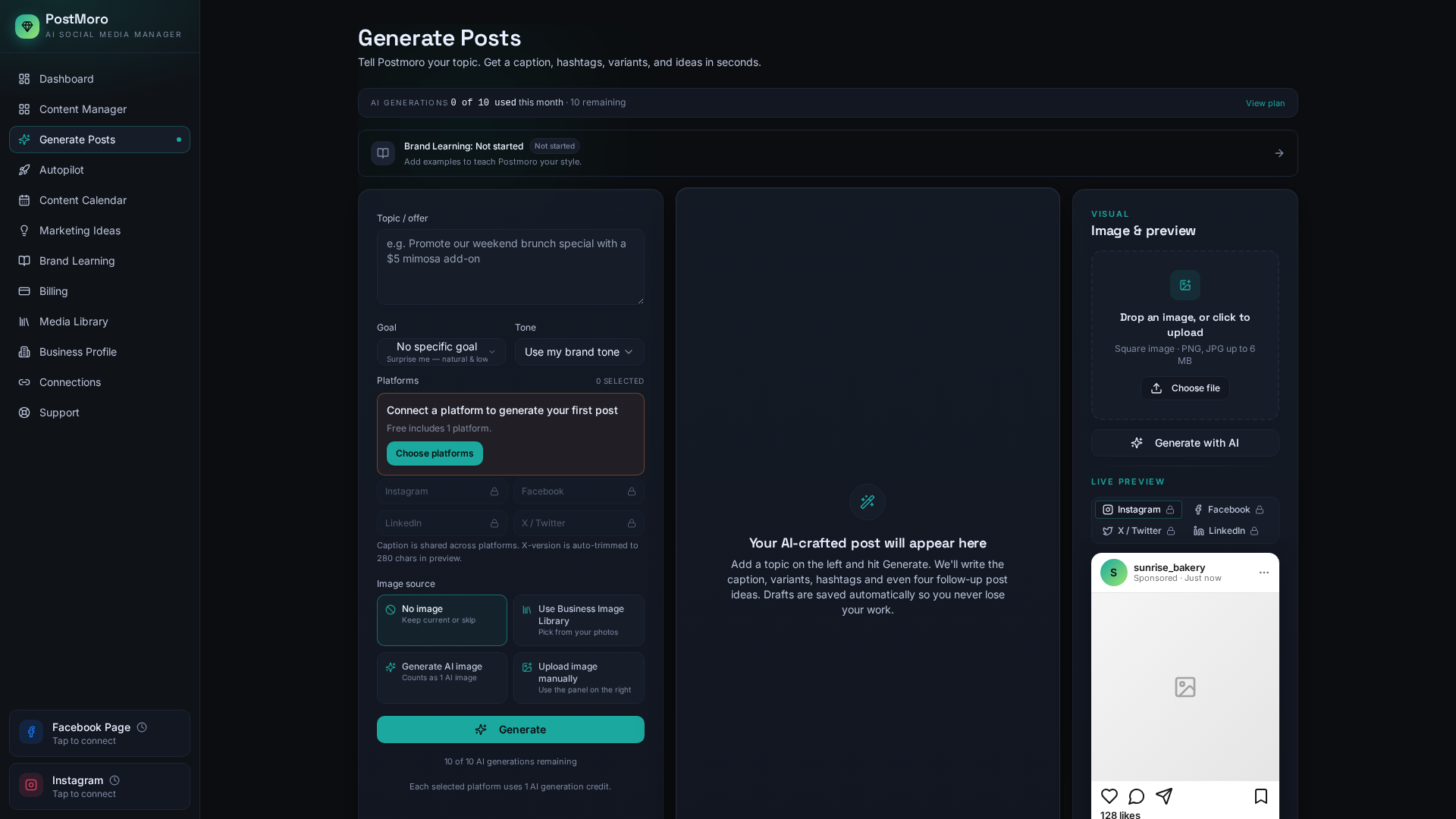
Postmoro's AI is designed to help small businesses create clearer, more relevant social media content. Three things happen every time you make a post.
Captions in your voice
Postmoro drafts each caption based on your business profile, your tone, and the past posts you feed into Brand Learning. Every draft is editable — nothing is locked. Change a word, change the whole thing, or start over. The AI takes the first swing so you don't have to face a blank page.
Hashtags that match the post
Instead of pasting the same twenty tags on everything, Postmoro suggests hashtags that relate to what's actually in the caption and the image. You can edit or remove any of them before the post goes live.
On-brand images
Postmoro generates an image for each post so you're not stuck picking through stock photography. If you'd rather use your own product, staff, or storefront photos, upload them once to the Business Media Library and they'll be available to reuse whenever you want.
Two flows
Autopilot for the week, manual for the moment
There are two ways to make posts in Postmoro, and they work together.
Autopilot
Autopilot plans a whole week at once. Pick the days you want to post, pick roughly what times work, and Postmoro fills the calendar with drafts. By default, each draft lands in an approval queue so you can look at it, edit anything, and send it live yourself. When you're ready to hand over more of the driving, one toggle in Autopilot settings switches to fully automatic — Postmoro then publishes on the schedule you set without asking again.
Manual
Manual is for the one-off. Something happened today that you want a post about. Open Generate, type the topic, get a caption and image in a few seconds, edit to taste, schedule or publish. You can flip between Manual and Autopilot whenever you like — there's no separate workflow to learn.
Networks
The networks Postmoro publishes to
Postmoro supports four networks — Facebook, Instagram, LinkedIn, and X. That's the list; nothing else is quietly implied.
Connect your Facebook Pages and Postmoro will list every Page you manage so you can pick which one to post from. Publish directly to Facebook Pages from Postmoro — draft creation, calendar planning, Brand Learning, and live publishing all work for your Page today.
Connect an Instagram professional account (Business or Creator) linked to your Facebook Page. Postmoro drafts single-image feed posts — the caption, the hashtags, and the image, ready to review — and publishes them live to Instagram. Reels and Stories aren't part of the composer today.
Postmoro posts to your LinkedIn personal profile. Publishing is live today. LinkedIn may periodically require you to reconnect your account. Postmoro shows an advance warning when your LinkedIn connection is nearing expiration and provides a direct reconnect option. Company Page posting isn't part of Postmoro yet.
X
Postmoro publishes single posts on X — text on its own, or text with one image. Publishing is live today. Threads, video, and long-form aren't part of the composer yet.
Plans
Plans that grow when you do
Postmoro has four plans, and every plan has real limits so you always know what you're getting. Start on Free Trial and move up whenever your posting volume grows.
- 10 AI generations / month
- 5 published posts / month
- All 4 social platforms
- No credit card required
- 50 AI generations / month
- 25 published posts / month
- All 4 social platforms
- Content calendar
- 200 AI generations / month
- 60 published posts / month
- All social platforms
- Marketing campaign ideas
- Drag-and-drop calendar
- Priority email + chat support
- Email MarketingComing Soon
- Ad CreationsComing Soon
- AI DM Bot / Community ManagementComing Soon
- AI Video CreationComing Soon
- Task & Calendar ManagementComing Soon
- 1,000 AI generations / month
- Unlimited published posts (fair-use)
- Teams — 3 team seats included
- Multi-platform Autopilot batching
- Business Media Library (30 reusable images)
- Custom brand voice
- Priority support + onboarding
- Email MarketingComing Soon
- Competitor AnalysisComing Soon
- Ad CreationsComing Soon
- AI DM Bot / Community ManagementComing Soon
- AI Video CreationComing Soon
- Task & Calendar ManagementComing Soon
FAQ
Frequently asked questions
Does Postmoro post for me automatically, or do I approve first?
By default, every Autopilot draft lands in your approval queue and only publishes when you approve it. If you'd prefer fully hands-off, there's a switch in Autopilot settings that lets Postmoro publish on the schedule you set without asking each time. You choose the mode; you can change it whenever.
Which social networks can I connect?
Facebook, Instagram, LinkedIn, and X. Postmoro publishes directly to Facebook Pages and Instagram professional accounts, along with LinkedIn personal profiles and X — all live today.
What happens if my LinkedIn access expires?
LinkedIn may periodically require you to reconnect your account. Postmoro shows an advance warning when your LinkedIn connection is nearing expiration and provides a direct reconnect option.
Do I need to bring my own hashtags?
No — Postmoro's AI generates hashtags tied to the caption and image for each post. You can edit them, remove any you don't want, or add your own.
How is Postmoro different from a generic scheduler?
A generic scheduler is a text box and a clock. Postmoro drafts the post for you, keeps your brand voice through Brand Learning, and lines everything up on the same calendar you'd already be using. You spend the review time you would have spent anyway — not the drafting time.
Analytics cookies
Postmoro uses Google Analytics to see which pages help visitors find us. It stores a cookie on your device only if you agree. We never send your name, email, or the content you create. Read our privacy policy.